
Security & Compliance
OpsPal provides enterprise-grade security designed specifically for UK leisure facilities, local authorities, and multi-site operators. Your operations platform holds sensitive data—incident reports (microsoft forms), staff records, customer information—and deserves the same level of protection as your finance systems. Built on AWS infrastructure and UK-hosted throughout, OpsPal meets the security standards expected during procurement and delivers the peace of mind you need to run your operations confidently.







































1. Enterprise Access Control
Single Sign-On (SSO) & Multi-Factor Authentication (MFA)
Streamline access while strengthening security. OpsPal integrates with your existing identity providers—Microsoft Entra—so your team accesses the platform through one centralised login. No more password resets, no more juggling credentials.
Add Multi-Factor Authentication to organisations that don’t have SSO to protect sensitive areas like reporting and staff records. It’s increasingly expected by insurers and auditors, and it’s built right in.
Why this matters:
- Centralised user management through your existing IT systems
- Meet insurance and audit requirements without additional complexity
- Reduce password-related support tickets by up to 60%
- Control exactly who accesses what with role-based permissions
2. UK Data Protection & Compliance
Your Data Stays in the UK—Always
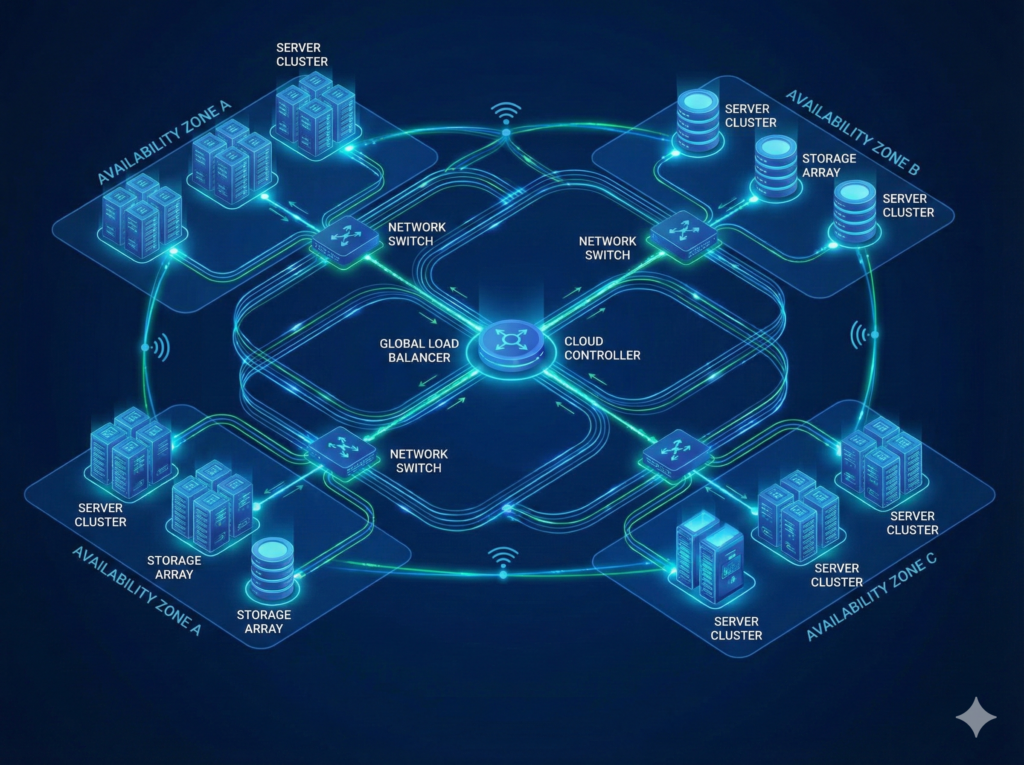
OpsPal runs entirely on AWS infrastructure housed in UK data centres across multiple London availability zones. Your operational data never leaves the United Kingdom, meeting local authority and public sector data residency requirements.
Key protections:
- UK-hosted servers: All data stored in AWS London data centres
- GDPR compliant: Full data protection compliance built into every feature
- Encryption everywhere: Data encrypted at rest and in transit using bank-level TLS/SSL certificates
- Automated backups: 24-hour snapshots stored across three UK availability zones
- Access controls: Granular permissions—from duty managers to senior leadership
- Audit trails: Complete activity logs for compliance reporting
- Sensitive Data Isolation: Unlike other platforms, OpsPal does not store your accident reports or safeguarding concerns. We integrate directly with Microsoft Forms, meaning this highly sensitive data remains strictly within your own Microsoft 365 tenant—OpsPal acts only as the secure signpost, never the vault
Meets requirements for:
- Local authority procurement frameworks
- University IT security policies
- Leisure trust governance standards
- Insurance and regulatory audits

3. Infrastructure Reliability & Resilience
Built to Keep Your Operations Running
Your facility can’t afford downtime—neither can your operations platform. OpsPal is built on AWS enterprise infrastructure with multiple layers of protection and automatic failover.
How we keep you operational:
- Multi-Availability Zones: Your data is distributed across physically separate London data centres. If one goes offline, you won’t even notice.
- Automated Failover: Server issues? Our system automatically switches to backup servers without interruption.
- 24/7 Monitoring: CloudWatch and New Relic continuously monitor performance, security, and uptime.
- Horizontal Autoscaling: System automatically adds server capacity during peak usage (think summer holidays or major events).
- 99.9% Uptime SLA: We’re committed to keeping your operations accessible when you need them.
4. Security Through Design
Layered Protection From Day One
OpsPal’s security isn’t an add-on—it’s fundamental to how the platform is built. Multiple security layers protect your data at every level.
Our security architecture:
- Virtual Private Cloud (VPC): Your application runs in an isolated private network—not on shared public infrastructure
- Security Groups & Firewalls: Control exactly which traffic reaches your data at both network and server level
- Web Application Firewall (WAF): Automatically blocks common web attacks and malicious traffic before it reaches your application
- Mutual TLS Authentication: Two-way verification between your users and our servers using X.509 certificates
- Private Database Access: Your database never has a public IP address—it’s only accessible through secured application servers
- Regular Security Audits: Continuous vulnerability scanning and patch management
Additional safeguards:
- Block Public Access: S3 storage (where documents and images live) blocks all public access by default
- IAM Access Management: Strict controls over who on our team can access what—principle of least privilege
- Incident Response Plan: Documented procedures for any security events
Questions About Security?
Our team can walk you through our security architecture, compliance documentation, or integration options for your specific IT environment.

Frequently Asked Questions
What is Single Sign-On (SSO) and how does it improve security?
Single Sign-On (SSO) is an authentication method that allows staff to access OpsPal using their existing Microsoft Entra (formerly Azure AD) credentials, eliminating the need to create and remember separate passwords for OpsPal. Instead of managing multiple usernames and passwords across different systems, staff log in once using their familiar Microsoft account, and that single authentication grants them access to OpsPal along with their other work applications like Outlook, Teams, and SharePoint.
SSO improves security by centralising password management and authentication through your organisation’s existing Microsoft Entra identity system. When staff leave your organisation or change roles, disabling their Microsoft account immediately removes their access to OpsPal and all other connected systems simultaneously, eliminating the common security risk of orphaned accounts with active credentials. IT teams manage permissions centrally rather than coordinating access removal across multiple independent systems, closing security gaps that occur when ex-staff retain login credentials to systems nobody remembered to disable.
The security benefits extend beyond access control. SSO eliminates password reuse across systems, where staff often use the same weak password for multiple applications because they struggle to remember different credentials. With SSO, your Microsoft Entra password policy (complexity requirements, regular changes, account lockout after failed attempts) applies to OpsPal access automatically, ensuring consistent security standards across your digital estate. Staff no longer write passwords on sticky notes or store them in unencrypted files because they only need to remember one set of credentials for all their work applications.
For organisations not using SSO, OpsPal offers Multi-Factor Authentication (MFA) as an optional security enhancement. MFA requires staff to provide a second verification method (typically a code sent to their mobile device) in addition to their password, significantly reducing the risk of unauthorised access even if passwords are compromised. This gives smaller organisations or those without Microsoft Entra the ability to strengthen their security without requiring enterprise-level identity management infrastructure.
Why is Multi-Factor Authentication (MFA) important for leisure operations?
Multi-Factor Authentication (MFA) is important for leisure operations because it protects sensitive operational data, staff training records, incident reports, and compliance documentation from unauthorised access even when passwords are compromised. For organisations that don’t use Single Sign-On with Microsoft Entra, MFA provides an essential additional security layer that prevents attackers from accessing OpsPal using stolen or guessed passwords, ensuring only authorised staff can view safety-critical information about your facilities and operations.
Leisure operations manage significant amounts of sensitive information that require protection. OpsPal contains staff training records, including qualification details; operational procedures that detail security processes and building access protocols; problem reports that may include photos of equipment failures or facility issues; and task completion records showing when staff were on duty and what they completed. If an ex-employee’s password is compromised, or a staff member accidentally uses the same password on a breached website, MFA prevents unauthorised access because the attacker can’t provide the second authentication factor (typically a code sent to the legitimate staff member’s mobile device). For more sensitive data like accident reports and safeguarding concerns, these are typically captured through Microsoft Forms integration, allowing organisations to keep such information locked away securely rather than in operational management systems.
The leisure sector faces particular security risks because staff turnover can be high, especially for seasonal workers and casual pool lifeguards who may move between multiple employers. Without MFA, these staff members leaving your organisation whilst retaining knowledge of their OpsPal passwords creates potential security vulnerabilities. Even if they don’t have malicious intent, using the same password across multiple leisure centres or sharing login credentials with colleagues creates access control problems that MFA helps mitigate by requiring device-based authentication that can’t be easily shared or reused.
For organisations using SSO with Microsoft Entra, MFA can be enforced through your existing Microsoft authentication system, providing enterprise-grade security across all connected applications, including OpsPal. For smaller organisations or those without SSO, OpsPal offers MFA as an optional security feature that significantly strengthens protection without requiring complex infrastructure. Enabling MFA demonstrates to insurers, auditors, and regulators that you take data protection seriously, which becomes increasingly important as leisure operations digitise more safety-critical processes and handle more personal data about staff and members.
How does SSO simplify staff access to OpsPal?
SSO simplifies staff access to OpsPal by eliminating the need to create, remember, and manage a separate password for OpsPal, allowing staff to log in using the same Microsoft Entra credentials they already use for Outlook, Teams, SharePoint, and other work applications. Staff click a single sign-on button, authenticate once with their familiar Microsoft account, and gain immediate access to OpsPal without creating yet another username and password combination to remember or write down.
The simplification benefits extend beyond just convenience for staff. New starters need to be registered in OpsPal so they can be configured for their specific site, team, and role (ensuring they receive the correct procedures, risk assessments, and tasks for their position), but once configured, they can access OpsPal immediately using their Microsoft Entra credentials without needing a separate OpsPal password. When SSO users forget their Microsoft password, they use the existing Microsoft password reset process they’re already familiar with. For non-SSO users (including those using MFA), OpsPal provides its own password reset functionality, so staff can reset their passwords directly without contacting support. This maintains operational continuity and reduces IT support workloads, regardless of which authentication method your organisation uses.
SSO also simplifies the user experience on mobile devices, where staff frequently access OpsPal for task completion, problem reporting, and procedure reference. Rather than typing complex passwords on small phone keyboards while wearing gloves poolside or in plant rooms, staff authenticates once and remains logged in securely. When they switch between OpsPal and other work applications like email or Microsoft Teams to check messages, they experience seamless access without repeated password entry, improving efficiency during busy operational shifts.
For IT administrators, SSO centralises authentication through Microsoft Entra whilst OpsPal user configuration ensures each staff member is allocated the correct information for their role, site, and team. Staff still need to be registered in OpsPal to configure which site they work at, which team they’re part of, and what procedures and risk assessments are relevant to their position, but SSO eliminates the need to create and manage separate OpsPal passwords. When staff join, change roles, or leave the organisation, their OpsPal authentication automatically follows their Microsoft account status, whilst OpsPal administrators update their site, team, and role assignments as needed. This reduces password management overhead whilst maintaining precise control over what operational information each staff member can access, particularly important for multi-site leisure operators managing hundreds of staff across multiple facilities with varying shift patterns and seasonal employment cycles.
Can OpsPal integrate with Microsoft 365 for SSO?
OpsPal integrates with Microsoft 365 through Microsoft Entra (formerly Azure AD) for Single Sign-On, allowing staff to access OpsPal using their existing Microsoft credentials without creating separate passwords. This integration works seamlessly with Microsoft 365 Business, Enterprise, and Education plans that include Microsoft Entra functionality, covering the vast majority of UK leisure trusts, local authorities, universities, and multi-site operators already using Microsoft 365 for email, Teams, SharePoint, and other workplace applications.
The integration reflects the reality of the UK leisure sector where Microsoft 365 dominates workplace IT infrastructure, particularly among local authorities and leisure trusts that typically manage leisure facilities. Council-run leisure centres, charitable leisure trusts, university sports facilities, and private leisure operators overwhelmingly use Microsoft ecosystems for their operational IT needs, making Microsoft Entra integration essential for OpsPal’s target market.
Setting up Microsoft Entra SSO with OpsPal requires IT administrator access to your Microsoft Entra admin portal (formerly Azure AD portal) to configure the application integration. OpsPal’s support team provides step-by-step documentation for the configuration process, which typically takes 30-60 minutes for IT teams familiar with managing cloud applications in their Microsoft environment. Once configured, SSO works automatically for all staff members, and new starters gain OpsPal access through their Microsoft account once they’ve been registered and configured in OpsPal with their appropriate site, team, and role assignments.
For organisations not using Microsoft 365 or those with Microsoft 365 plans that don’t include Microsoft Entra functionality, OpsPal offers standard username/password authentication with optional Multi-Factor Authentication (MFA) for enhanced security. This ensures all organisations can use OpsPal securely regardless of their existing IT infrastructure, whereas organisations with Microsoft 365 can benefit from the simplified authentication and centralised access control that SSO provides.
What security standards does OpsPal comply with?
OpsPal complies with UK data protection regulations including GDPR (General Data Protection Regulation), maintaining appropriate technical and organisational measures to protect operational data, staff training records, and task completion information stored within the platform. The system is hosted on secure cloud infrastructure with encryption in transit and at rest, regular security updates, and access controls that ensure staff only see information relevant to their role, site, and team assignments.
Data residency meets UK requirements with information stored in UK-based or EU-based data centres, ensuring compliance with data protection legislation affecting public sector organisations, leisure trusts, and charities that manage leisure facilities. This is particularly important for local authorities and organisations subject to public sector IT security requirements, where data sovereignty and demonstrable compliance with UK regulations are essential for procurement and operational governance.
OpsPal implements role-based access control ensuring staff receive notifications and assigned tasks relevant to their specific role, whilst maintaining visibility across departments at their site to prevent operational silos. The bell notification area shows role-specific items requested for that staff member, but they can view other departments’ information at their site. This means if a receptionist doesn’t come in, the duty manager can see what the receptionist should have been doing and ensure nothing gets missed. Staff only see information for sites they’re assigned to—a lifeguard working at your Anytown Leisure Centre cannot access data from your Othertown facility—but within their assigned site, they can view tasks and procedures across departments. This design deliberately breaks down silos whilst maintaining appropriate boundaries, enabling operational flexibility and continuity particularly important for smaller leisure centres where staff cover multiple roles.
For organisations requiring additional security, Microsoft Entra SSO integration allows you to enforce your existing security policies (password complexity, MFA requirements, conditional access rules, session timeouts) across OpsPal access automatically. For organisations without SSO, staff can choose to enable Multi-Factor Authentication on their individual accounts for enhanced personal security, and OpsPal supports password complexity requirements. Regular security updates and patches are applied to the platform automatically without requiring downtime, ensuring protection against emerging threats whilst maintaining continuous operational availability.
OpsPal also supports audit trail requirements for regulatory compliance, maintaining complete logs of who completed which tasks, when procedures were acknowledged, when risk assessments were reviewed, and when problems were logged and resolved. This audit trail evidence supports HSE inspections, Quest assessments, ukactive TAS reviews, insurance audits, and internal governance requirements, demonstrating systematic operational management and accountability across your leisure estate.
Book a Call With Our Team
We’re on hand for any questions you may have. Simply book a meeting using our booking system and we will talk you through any questions.